Applying CCNA Fundamentals in AWS: Linux Firewalling, Defense in Depth, and Splunk Validation
Problem
I earned the CCNA in February 2026, and I wanted a project that helped me keep that knowledge active through periodic hands-on practice. CCNA stands for Cisco Certified Network Associate, and it represents foundational networking knowledge around topics like IP addressing, routing, switching, ports, protocols, security fundamentals, and network troubleshooting. I did not want that knowledge to fade after passing the exam. I wanted to keep applying it in realistic ways and connect it with technologies I use in my homelab, including AWS, Linux, and Splunk.
The question behind this project was simple: can I use a Linux host firewall in AWS, collect the right logs, and prove the behavior in Splunk?
I wanted this project to connect a few areas of focus: CCNA networking fundamentals, Linux administration, AWS architecture, Splunk visibility, and future learning around offensive security and routing concepts like BGP. A homelab gives me a place to keep building those connections safely.
Lab Setup
I used my existing distributed Splunk Enterprise homelab in AWS as the foundation. The environment already included a Cluster Manager, three indexers, three search heads, a Deployer, a Deployment Server, a Management Server for the License Manager and Monitoring Console, Universal Forwarder-based collection, search head clustering, and indexer clustering.
For this project, I added two Ubuntu EC2 instances. One was the firewall target host, and the other was the test client. The target host ran NGINX and UFW. The test client generated controlled traffic so I could validate what was allowed, what was denied, and what Splunk could see.
The AWS Security Group allowed only the traffic needed for the test. HTTP was allowed from the test client to the target host. A separate test port was allowed at the AWS layer but denied by the Linux host firewall so I could prove the host firewall was making the final decision. I did not expose test ports broadly to the internet.
That design was intentional. If AWS blocked everything first, the Linux firewall would never see the traffic. If AWS allowed too much, the test would be unsafe. The goal was to create a narrow path where both layers had a purpose.
What I Built
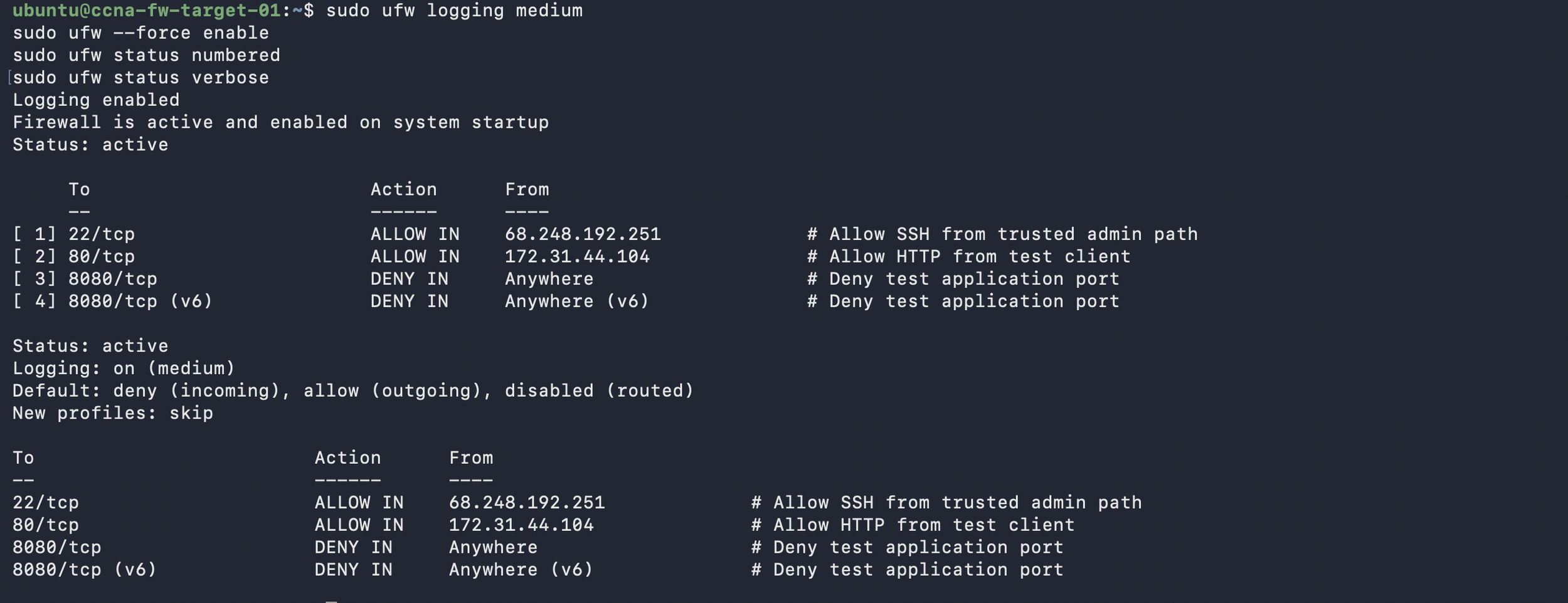
The Linux host firewall was configured with UFW, Ubuntu’s default firewall configuration tool. Underneath that, Linux packet filtering depends on the kernel’s netfilter subsystem, and tools like iptables or nftables manage the rule logic. I used UFW because it made the lab safer and easier to read, while still giving me a way to inspect the lower-level firewall rules.
The rules were simple but realistic. The first rule was default deny inbound traffic. The second allowed SSH only from a trusted administrative path. The third allowed HTTP only from the test client. I also denied TCP/8080 as a test port so I could generate blocked traffic and validate that the firewall logs appeared in Splunk.
This tied directly back to CCNA concepts. A Linux host firewall mostly works at Layer 3 and Layer 4: source IP, destination IP, protocol, and port. It can track connection state, but it is not the same thing as a Layer 7 web application firewall. That distinction matters. Blocking TCP/8080 is a network and transport-layer decision. Understanding whether an HTTP request is malicious requires application-layer visibility from logs, a proxy, WAF, IDS, or another control.
Splunk Logging and Dashboard
For Splunk, I used Universal Forwarders on the Ubuntu hosts and managed inputs through the Deployment Server. The Splunk Add-on for Unix and Linux provided a good foundation for Linux host data, while a custom app collected UFW logs, NGINX logs, and a root-collected firewall posture log.
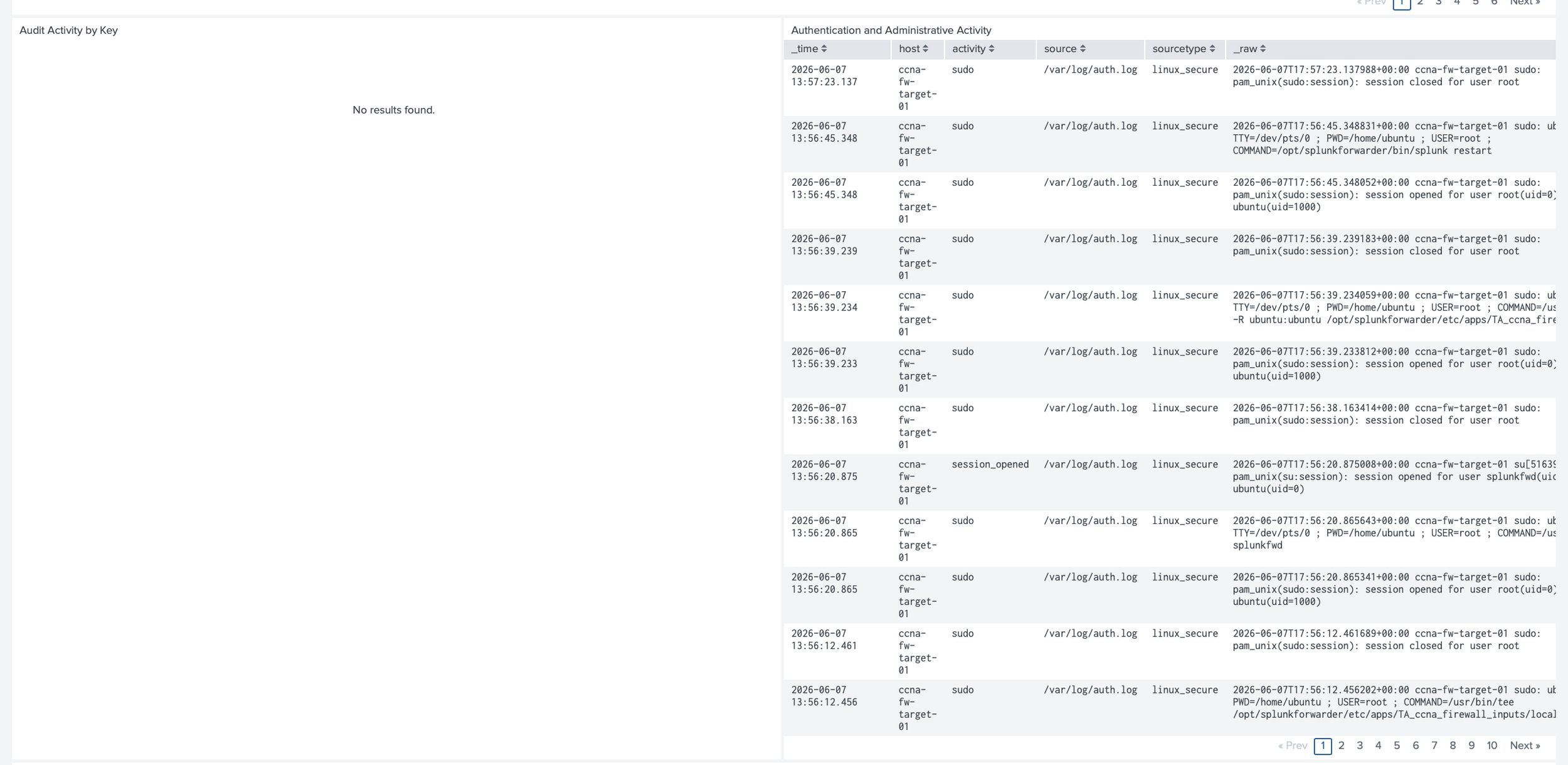
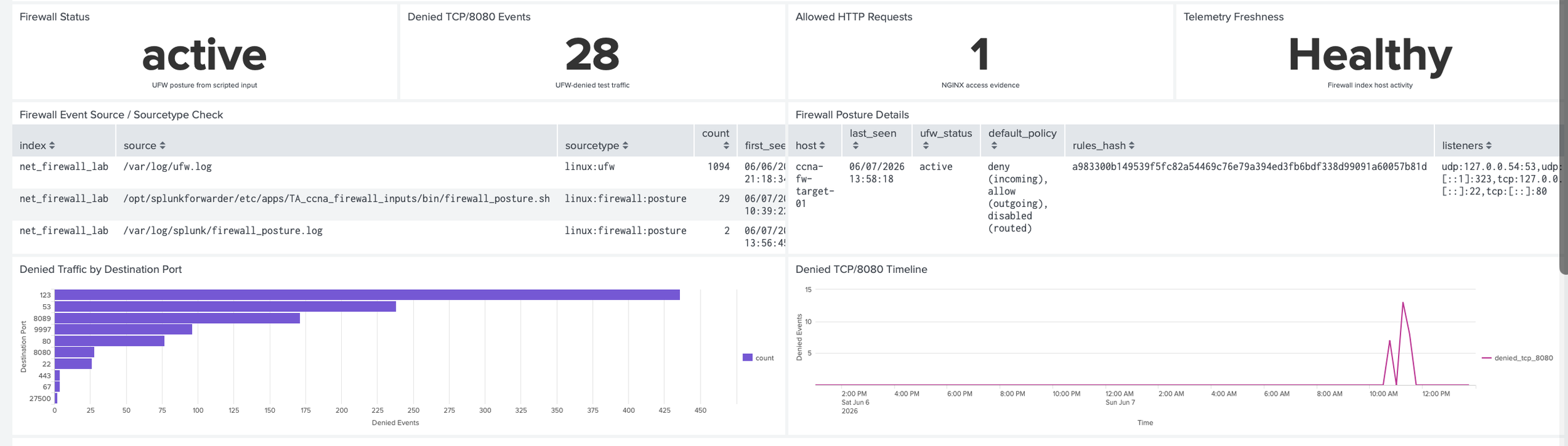
The dashboard had several main views. The first showed whether UFW was active and what the default policy looked like. The second showed blocked traffic by source IP, destination IP, protocol, and destination port. The third showed allowed web traffic from NGINX access logs. The fourth showed authentication and administrative activity related to firewall changes. The fifth checked whether expected telemetry had stopped arriving.
That last panel mattered more than I expected. It is easy to build a dashboard that looks useful when data is flowing. It is more valuable to ask whether the dashboard can tell me when visibility breaks.



Security and Implementation Notes
This project showed why a host firewall can still matter in AWS. Security Groups are powerful, but they are not the only layer. A Linux host firewall can provide local enforcement if a cloud rule is changed, if an instance is moved, or if the host needs a more specific local policy than the surrounding network allows.
It also showed where the host firewall stops. UFW and iptables are not full application inspection tools. They can make strong decisions about IPs, protocols, ports, and connection state, but they do not replace application logs, vulnerability management, endpoint telemetry, or cloud-native controls. The better lesson was that each layer should answer a different question.
What I Learned
The most useful part of this project was seeing how certification knowledge turns into operational judgment. It is one thing to know what a port is. It is another thing to decide whether that port should be open, where it should be open from, which layer should enforce it, and how to prove the decision worked.
I also saw how easy it is to confuse layers if I do not slow down. A Security Group, a NACL, a Linux host firewall, and an application log can all describe network activity, but they do not answer the same question. The Security Group asks what should reach the instance. The host firewall asks what the server should accept. The application log shows what the service handled. Splunk helps connect those views.
How to Reproduce
Start with two Ubuntu EC2 instances in AWS: one firewall target and one test client. Scope the Security Groups so only the required traffic is allowed between them. Do not open test ports to the internet.
Install NGINX and UFW on the target host. Set the firewall to deny inbound traffic by default, then allow only the required administrative path and HTTP from the test client. Use `iptables -S`, `iptables -L -n -v`, or `nft list ruleset` to inspect how the rule set is represented beneath the UFW workflow.
Install Universal Forwarders on both hosts and use the Deployment Server to assign the Linux firewall input app. Monitor authentication logs, syslog, UFW logs, NGINX access logs, NGINX error logs, and the root-collected firewall posture log. Validate the data before building the dashboard.
Generate test traffic from the client. Use `curl` to confirm allowed HTTP traffic. Use `nc` to test denied TCP/8080 traffic. Then confirm the results in Splunk: allowed web access in NGINX logs, denied traffic in UFW logs, firewall posture from the root-collected log, and host visibility from forwarder metadata.
Next Improvements
The next improvement is to add AWS VPC Flow Logs so I can compare cloud-network visibility with host-firewall visibility and show what AWS observed versus what the Linux host accepted or denied. Longer term, I want this to become part of a broader networking series that includes Linux firewalls, VPC Flow Logs, routing tables, NAT, VPNs, BGP concepts, stricter outbound rules, and eventually security testing in controlled lab environments. The goal is to keep the CCNA knowledge alive by using it.
Conclusion
I know how quickly technology changes and how critical the foundations are. Networking is one of those foundations because ports, protocols, traffic flow, segmentation, and layered defense shape how systems communicate and how security controls are designed.
This project was a reminder of why networking fundamentals matter: understanding the path data takes, which layers it moves through, and how that flow gets validated within an environment. In this case, the validation was proving that network traffic flowed as it was architected to. That is the kind of practical, evidence-driven thinking I want to keep building through my homelab.
The views expressed here are my own and do not represent any employer or organization.